> For the complete documentation index, see [llms.txt](https://docs.freedomfactory.io/llms.txt). Markdown versions of documentation pages are available by appending `.md` to page URLs; this page is available as [Markdown](https://docs.freedomfactory.io/docs/setup-your-dgen1.md).
# Setup your dGEN1
All you need to know to start using your dGEN1
## Unbox your dGEN1
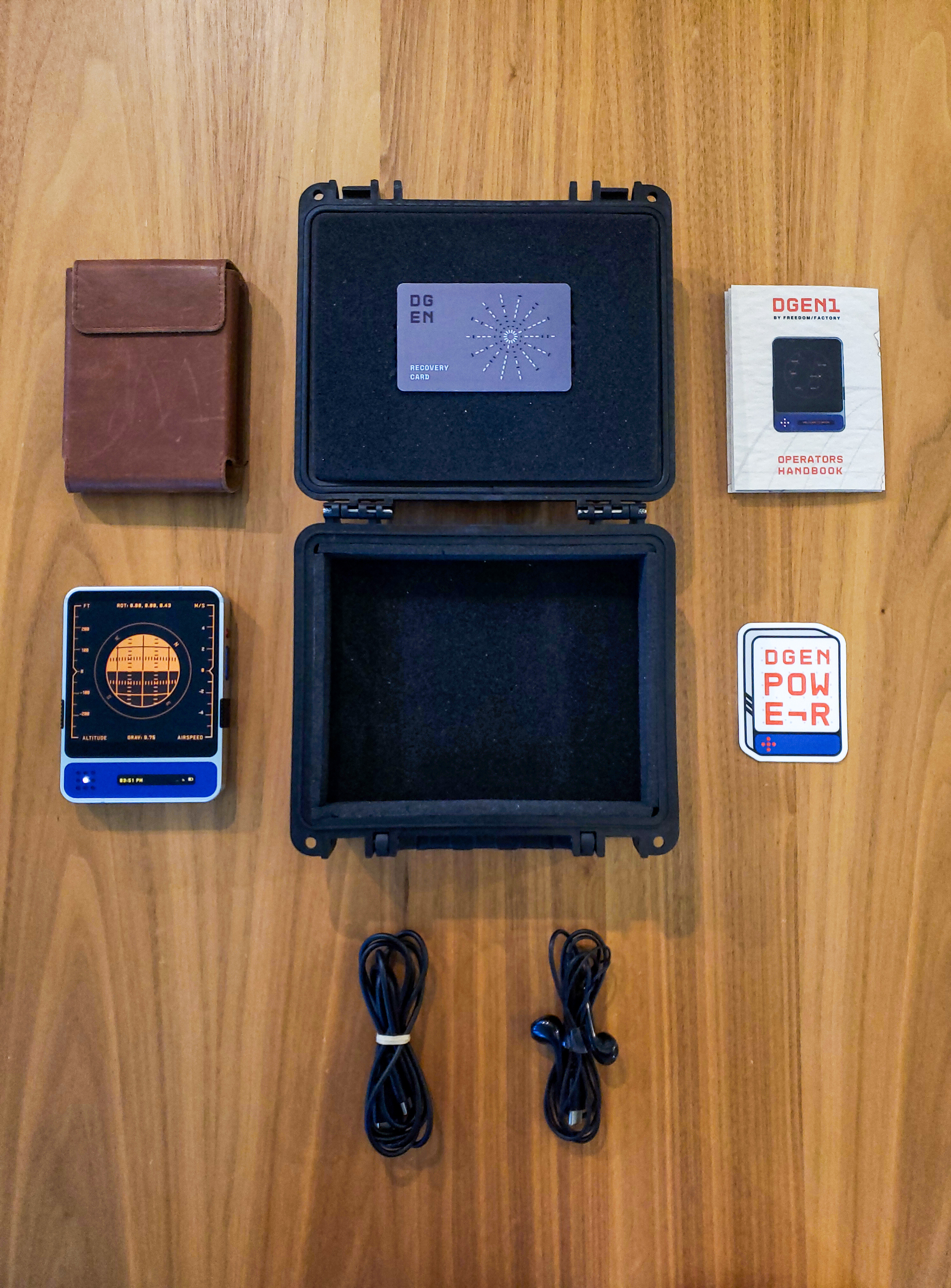
Inside the the box, you will be greeted by:
* Your dGEN1, located inside its leather pouch
* A silver colored recovery card. This card allows you to retrieve your digital assets in case of theft or damage of the device. For further information, please consult the [Recovery - dGEN1 Burner Card](/docs/setup-your-dgen1/recovery-dgen1-burner-card.md)
* USB-C cable with integrated physical switch to disable or enable data transfers
* USB-C earbuds. These earbuds lack ANC support which allows users to listen to AM/FM Radio when plugged to the dGEN1
* An information leaflet
* Stickers!
 ## Prepare the Device
1. Retrieve the dGEN1 from its box and sleeve,
2. Unpeel the protective spacer on the side of the device
3. Turn your dGEN1 on by pressing the the blue, pill-shaped button on the right side of the device.
## The Setup Process
1. Once the boot sequence is complete, you will be greeted with the welcome screen. Press the "GET STARTED" button to initiate the device setup:
1. (Optional) Connect to a Wi-Fi network.
#### Initialize your recovery card
1. Take the recovery card, and press it against the back of the device.
2. Dial your 6-digit pin one prompted.
3. Re-enter the same PIN to confirm it.
4. Press the recovery card against the device to initialize the card.
#### Setup manually with NFC
1. Press on "SKIP"
2. When prompted, select the "I UNDERSTAND" option
3. Visit this website on a smartphone with NFC capability and select the "VIEW CARD ADDRESS" option:
4. Press the recovery card against the device until a QR code appears
5. Scan the QR code with your dGEN1 to populate the text field
6. Confirm by pressing "NEXT" on the top right
#### Import an ENS or eth address
1. Press on "SKIP"
2. When prompted, select the "I UNDERSTAND" option
3. Now insert your ens or / eth-address either via the text field or via QR-Code scanning.
4. Confirm by pressing "NEXT" on the top right
#### (Optional) Create device PIN
1. When prompted, insert your 6-digit pin.
2. Re-Enter the same PIN to confirm it. For security reasons, do not use the same PIN for your device and recovery card
#### Register your fingerprint
1. Tap the circular finger print sensor on the back of your device, until the square is filled To maximize fingerprint recognition, move your finger so that it fills the entire sensor
#### (Optional) generate your XMTP identity
XMTP is the official messaging protocol used for the onboard messenger. To use it you first need to enroll your wallet.
For more information, check the [dGEN1 Features](/docs/dgen1-features.md) section
## FAQ
#### Where do I manage my private keys?
You don't. Keys are generated on-device and are never exposed, not even to us developers. This is by design
#### If I can't manage my private keys, how can I recover my funds in case of loss of the device?
The dGEN1 runs a "smart account". Compared to the usual private-key managed accounts, you can add multiple signers to it, meaning that if you lose one signer (in this case, the dGEN1), you can still access all your funds via your recovery option (in this case, the recovery card or recovery address). As of right now you can only have one recovery option, but multiple could be theoretically added in a future update.
#### I need to reset my device. Will I lose my funds if I do?
No, you can still recovery your funds right here: on any device equipped with an NFC reader (i.e. Most smart phones)
#### I lost my recovery card. What can I do?
Treat your recovery card like your seed phrase, when you lose it and your dGEN1, just like your seed phrase, consider it gone.
## Prepare the Device
1. Retrieve the dGEN1 from its box and sleeve,
2. Unpeel the protective spacer on the side of the device
3. Turn your dGEN1 on by pressing the the blue, pill-shaped button on the right side of the device.
## The Setup Process
1. Once the boot sequence is complete, you will be greeted with the welcome screen. Press the "GET STARTED" button to initiate the device setup:
1. (Optional) Connect to a Wi-Fi network.
#### Initialize your recovery card
1. Take the recovery card, and press it against the back of the device.
2. Dial your 6-digit pin one prompted.
3. Re-enter the same PIN to confirm it.
4. Press the recovery card against the device to initialize the card.
#### Setup manually with NFC
1. Press on "SKIP"
2. When prompted, select the "I UNDERSTAND" option
3. Visit this website on a smartphone with NFC capability and select the "VIEW CARD ADDRESS" option:
4. Press the recovery card against the device until a QR code appears
5. Scan the QR code with your dGEN1 to populate the text field
6. Confirm by pressing "NEXT" on the top right
#### Import an ENS or eth address
1. Press on "SKIP"
2. When prompted, select the "I UNDERSTAND" option
3. Now insert your ens or / eth-address either via the text field or via QR-Code scanning.
4. Confirm by pressing "NEXT" on the top right
#### (Optional) Create device PIN
1. When prompted, insert your 6-digit pin.
2. Re-Enter the same PIN to confirm it. For security reasons, do not use the same PIN for your device and recovery card
#### Register your fingerprint
1. Tap the circular finger print sensor on the back of your device, until the square is filled To maximize fingerprint recognition, move your finger so that it fills the entire sensor
#### (Optional) generate your XMTP identity
XMTP is the official messaging protocol used for the onboard messenger. To use it you first need to enroll your wallet.
For more information, check the [dGEN1 Features](/docs/dgen1-features.md) section
## FAQ
#### Where do I manage my private keys?
You don't. Keys are generated on-device and are never exposed, not even to us developers. This is by design
#### If I can't manage my private keys, how can I recover my funds in case of loss of the device?
The dGEN1 runs a "smart account". Compared to the usual private-key managed accounts, you can add multiple signers to it, meaning that if you lose one signer (in this case, the dGEN1), you can still access all your funds via your recovery option (in this case, the recovery card or recovery address). As of right now you can only have one recovery option, but multiple could be theoretically added in a future update.
#### I need to reset my device. Will I lose my funds if I do?
No, you can still recovery your funds right here: on any device equipped with an NFC reader (i.e. Most smart phones)
#### I lost my recovery card. What can I do?
Treat your recovery card like your seed phrase, when you lose it and your dGEN1, just like your seed phrase, consider it gone.